Monday, November 29, 2021

Windows Server 2019 - LAB08 Implementing storage solutions (Part3) Implement Storage Spaces Direct

Part 3:  Implement Storage Spaces Direct

What is Storage Spaces Direct?

Storage Spaces Direct is the evolution of Storage Spaces. It leverages Storage Spaces, Failover Clustering, Cluster Shared Volumes (CSVs), Software Storage Bus, and SMB 3.x to implement virtualized, highly-available shared storage by using local disks on each of the Storage Spaces Direct cluster nodes. It is suitable for hosting highly-available workloads, including virtual machines and SQL Server databases. Storage Spaces Direct supports both direct-attached storage (DAS) and JBODs. This eliminates the need for a shared storage fabric and enables you to use a mix of SATA disks to lower costs and NVMe devices to improve performance.


Sunday, November 28, 2021

Windows Server 2019 - LAB08 Implementing storage solutions (Part2)

Part2: Configure Storage Spaces :

The main steps in the process Configure Storage Spaces are:
  • configured a file server with 4 news data disks .
  • Create a storage pool. 
  • Create a mirrored virtual disk hosting a single volume. 
  • Test workload when remove disk 

Saturday, November 27, 2021

Windows Server 2019 - LAB08 Implementing storage solutions (Part1)


Part1: After completing this lab, you'll be able to:
  1. Implement Data Deduplication.
  2. Configure Internet Small Computer System Interface iSCSI storage.
1. Implement Data Deduplication:

Assume you are already have files server in your org & we also have many duplicate files increase day by day due to operation of end users. So we will implement Data Deduplicate on file server to saving storage space. We will install the Data Deduplication role service , before enable data deduplicate we need to checking currently capacity on file server. After that we will enable data deduplicate to verify the benefits of data deduplicate service.

Friday, November 19, 2021

MS 365 - Restrict creation of teams by modifying group creation permissions

You can restrict Microsoft 365 Group creation, for example, to the members of a particular security group.

To restrict the creation of new teams, you need to modify the Microsoft 365 Groups creation permissions since all teams are based on Microsoft 365 Groups.

If you want to restrict the creation of new Teams to a subset of users, you need to create a security group and use the AzureAD PowerShell module to modify the AzureAD Directory Settings on a tenant basis. If you run the following script in your environment, you will stop users from creating new Microsoft 365 groups unless they are a member of the security group you specified in the first line of the script.

Sunday, November 14, 2021

Windows Server 2019 - LAB07 Implementing and configuring network infrastructure services in Windows Server

DHV, Ltd. is a large organization with complex requirements for network services. To help meet these requirements, you will deploy and configure DHCP so that it is highly available to ensure service availability. You will also set up DNS so that your client can have resolve DNS server in your local domain.

After complete this lab you can:

  • Deploy and configure DHCP
  • Deploy and configure DNS 

I'll use 4 VMs for this lab

  • DHVHCMSRV001 - PDC (Desktop Experience) with DNS interactive on ADDS, DHCP services already install & configured.
  • DHVHCMSCORE001 - SDC (Window Server Core) with DNS interactive on ADDS, we will install DHCP on this server
  • DHVHCMWAC001 - Windows Admin Center
  • DHVHCMCLI001 - Windows 10 Client for testing

Saturday, November 13, 2021

Windows Server 2019 - LAB06 Deploy & using certificate services (AD CS)

Your org has decided to implement a public key infrastructure (PKI) by using the AD CS (Active Directory Certificate Services) role in Windows Server 2019. As a system administrator, you are responsible for implementing certificate enrollment. You also will be developing the procedures and process for managing certificate templates.


Friday, November 12, 2021

Windows Server 2019 - LAB05 Configuring Group Policy & Review the effects of the GPO’s settings

Task 1: Create and edit a GPO on windows server 2019

  • Scenario: I've installed Windows Admin Center & already added one Window 10 PC client to management on WAC. But i can't connect to client from WAC due to the service WinRM has not start & got deny from Window Defender Firewall on  that client. If we have a hundred clients we can not goes to individual PC to config him, so we use GPO to solve problem. 

Task 2: Test override policy: phase 1 create standard police apply on top domain , phase 2 create new one override policy apply at OU level. Apply, verify settings on the client computer & verify the order of precedence.

Thursday, November 11, 2021

Windows Server 2019 - LAB04 Deploying a new domain controller on Server Core

Task 1: Deploy ADDS on a new Windows Server Core server

  • I'll use PDC with desktop experience to deploy DC for Windows Server Core server 
    Note : dhvhcmscore001 : Windows Server Core server's computer name & He already joined to my local domain
  • Also, you can use Window Admin Center to deploy DC for Windows Server Core server: on WAC connect to your Windows Server Core server then select Roles & Features on the left menu & tick on check box Active Directory Domain Services then click install

Task 2: Manage AD DS objects with GUI tools and with Windows PowerShell.


Wednesday, November 10, 2021

Windows Server 2019 - LAB03 Implementing and using remote server administration via Windows Admin Center

Windows Admin Center (WAC) is a locally deployed, browser-based app for managing Windows servers, clusters, hyper-converged infrastructure, as well as Windows 10 PCs. It is a free product and is ready to use in production. Prepare: you can go to MS official to download WAC.


Login to host that you wanna use to install Window Admin Center then double click on WindowsAdminCenter2110.msi . In my case, i used Window Server 2019 to deploy WAC.

Tuesday, November 9, 2021

Window Server 2019 - LAB02 Deploying and configuring Windows Server Core

Before we start , you need the iso image for WS2019 or you can download iso for windows server 2019 on MS official site

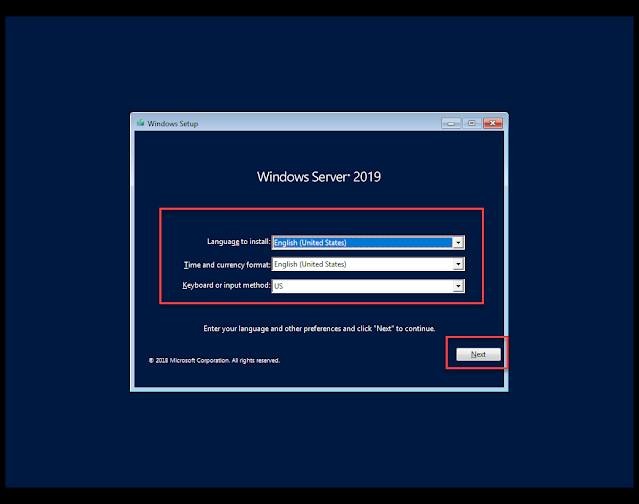
Task 1: Install Server Core

Step1: At windows setup window: choose your Language, Time and Keyboard settings, and then select Next


Windows Server 2019 - LAB01 Install Primary Domain Controler ( ADDS, DNS, DHCP )

When you working for any org that used windows platform, probably you will implement ADDS, DNS, DHCP for your Org on windows server 2019.

Before we start, you need to do some preparation task before we install them: fresh install WS2019, change time zone, change the computer name, config static IP for you first DC & update lasted...

Server Manager > Manage > Add Role & Features:


Saturday, April 24, 2021

Prometheus & Grafana - Monitor windows server (windows_exporter)

 Preference: https://github.com/prometheus-community/windows_exporter

pls take a note: windows_exporter supports Windows Server versions 2008R2 and later, and desktop Windows version 7 and later.

Download exporter: windows_exporter-0.16.0-amd64.msi

Tuesday, April 13, 2021

Add LDAP Authentication and Lookup plugin on osTicket

In the last post i've gudie How to install osTicket v1.15.2 on Ubuntu 20.04 , now i need my users can login to SCP via AD account, follow step bellow to do that.

Step 1: you need to download plugin from https://osticket.com/download/ then upload the phar file to the include/plugins folder of your osTicket installation.

Step 2: install PHP LDAP extension

sudo apt-get install php-ldap

Saturday, April 10, 2021

How to install osTicket v1.15.2 on Ubuntu 20.04


osTicket is a widely-used open source support ticket system. It seamlessly integrates inquiries created via email, phone and web-based forms into a simple easy-to-use multi-user web interface. Manage, organize and archive all your support requests and responses in one place while providing your customers with accountability and responsiveness they deserve


Monday, February 22, 2021

Windows Server 2019 - LAB08 Implementing storage solutions (Part3) Implement Storage Spaces Direct

Part 3:  Implement Storage Spaces Direct What is Storage Spaces Direct? Storage Spaces Direct is the evolution of Storage Spaces . It lever...